Windows 7 TLS 1.2 Activation

Go Back to List of FAQs  Previous  Next


Windows Internet TLS Security Settings


Jewelry Shopkeeper periodically checks that your Internet security / encryption "TLS" setting is high enough.


If Shopkeeper presents a warning, it might be false alert, but it's worth checking.


Visit this security checking site BrowserLeaks to ensure that TLS 1.2 or TLS 1.3 are enabled:


 https://browserleaks.com/tls


clip0995


If they are NOT enabled, in Windows 10 or 11 open the Windows Control Panel


clip0994

then Internet Options


clip0993

Then in the Advanced tab, verify that TLS 1.2 and TLS 1.3 are checked.


clip0996


In Windows 7, you must manually change Control Panel Internet Options:


clip0652


Click Start

clip0261


clip0651


And type (1): Internet Options


Select Internet Options from  the results (2)


clip0655


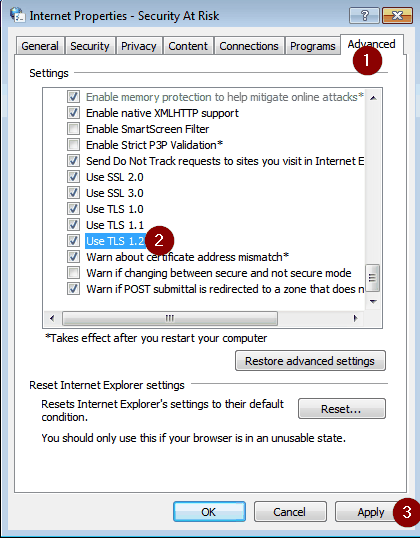
Select the Advanced Tab (1)


Scroll Down and check TLS 1.2 (2) and click Apply (3)
 

clip0653


The setting may not immediately take effect, so a reboot couldn't hurt.