Cancel Layaways and Refund Payment or Issue Credit or retain any Deposit
If you have a layaway with a deposit, it might look like this with a certain total and a down-payment showing.
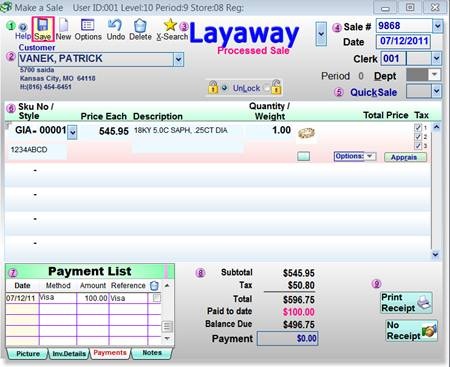
To cancel the layaway, we suggest that you put the same Sku on line 2 with a minus-one ( -1 ) quantity which will zero out the layaway but leave the amount paid.
Before you can edit the sale, you have to Unlock the Padlock
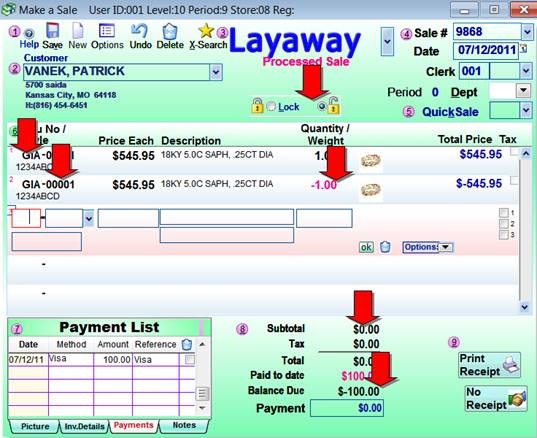
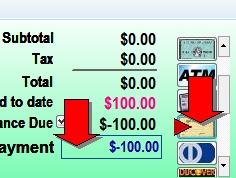
Then you can double-click the payment box at the bottom to enter the credit amount (or manually type the minus of the payments) then pick the Credit Slip Box
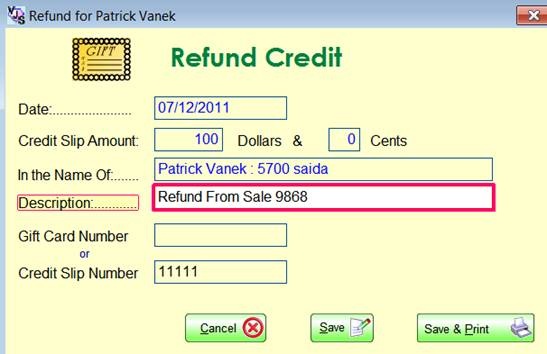
Then it will create a credit slip where you adjust the description and you can print it. But it's not necessary to print it; Shopkeeper will remember the credit for that customer under the credit slip number.
That will return you to the sale screen where you print a sales ticket and it will ask if you want to finalize the sale to which you respond Yes.

But . . . what if you are keeping the deposit?
In that case, add the minus-one Sku for the inventory item as above to zero the sale.
Then on the third line add a new (dummy) Sku for, say, $50 non-taxable (whatever deposit amount you received). That way, the sale total will be, say, $50, with matching payments of $50 and then you close out the sale.
For this dummy Sku, you could use a repair Sku or you could make a special major code for "forfeited deposits" and so you'd get a special dummy Sku for that. Note that you should make this major code a "Repair" type so that the inventory quantity is not adjusted each time you use it. Also make it non-taxable.